Realm Mobile Database


I. Realm là gì?

Ngày nay, việc phát triển ứng dụng di động đang trở thành xu hướng và phổ biến khắp mọi nơi. Trong mỗi ứng dụng thì phần quan trọng không kém chính là Cơ sở dữ liệu. CSDL phổ biến nhất được sử dụng hiện nay trên hầu hết các thiết bị là SQLite bởi vì nó khá quen thuộc với đại đa số các lập trình viên do sử dụng câu truy vấn SQL. Tuy nhiên, SQLite cũng có những mặt hạn chế nhất định như tốc độ truy vấn khá chậm khi mà dữ liệu phình to ra cũng như khi mà thực hiện phép JOIN. Trên cơ sở đó, Realm Mobible Database ra đời với mục đích cung cấp cho lập trình viên một lựa chọn có thể thay thế cho SQLite hiện nay nhưng vẫn đảm bảo mọi chức năng cần thiết của một CSDL thông thường:
  • Realm Moblie Database ( gọi tắt là RMD) là một NoSQL ( Not Only SQL). Nó hướng tới việc xây dựng một ứng dụng theo hướng Offline database first. Điều này có nghĩa là ứng dụng vẫn có thể hoạt động dù cho không có kết nối mạng, dữ liệu sẽ được lưu trực tiếp trên thiết bị, người dùng vẫn có thể tiến hành mọi việc một cách thuận lợi.
  • RMD lưu trữ dữ liệu dưới dạng Object và nó cũng cung cấp các hàm và phương thức để có thể truy vấn dữ liệu mà không cần thông qua câu truy vấn SQL.
  • Phần core của RMD được viết bằng C++ và là mã nguồn mở, người dùng có thể tùy chỉnh lại theo ý muốn cá nhân.
  • Cross-flatform và đã có phiên bản cho các ngôn ngữ sau: Swift, Java, Objective – C, Xamarin, React Native.
  • Cung cấp miễn phí.

II. Điểm mạnh của Realm Mobile Database

  1. Dễ cài đặt và sử dụng
  • RMD khá dễ cài đặt và sử dụng. Đối với IOS, chúng ta có thể sử dụng thư viện quản lý CocoaPods để cài đặt và sử dụng.
  • Để sử dụng RMD, chúng ta chỉ cần tạo một class như bình thường, và kế thừa từ class “Object” của RMD.
  1. Tốc độ truy vấn nhanh.
  • RMD được tối ưu hóa để sử dụng bộ nhớ một cách ít nhất nhưng hiệu suất vẫn vượt trội so với các CSDL khác.
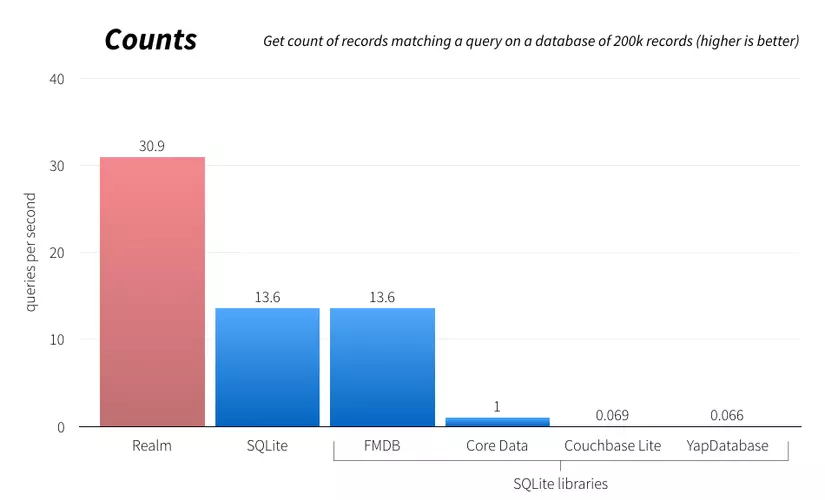
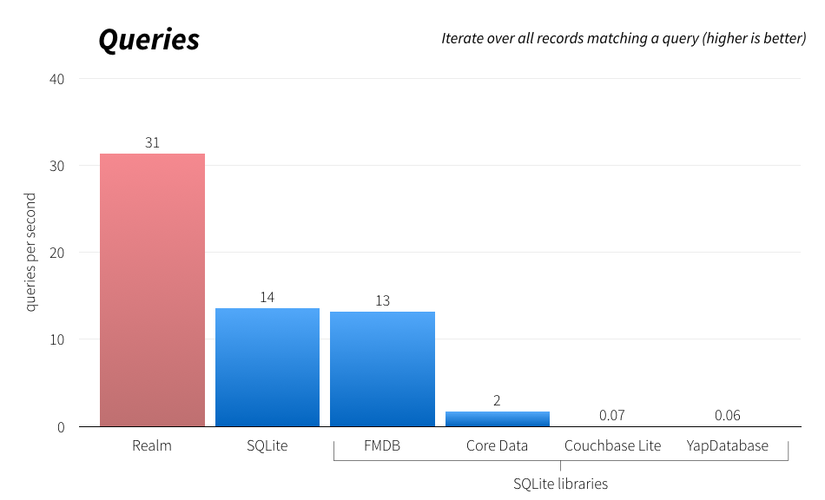
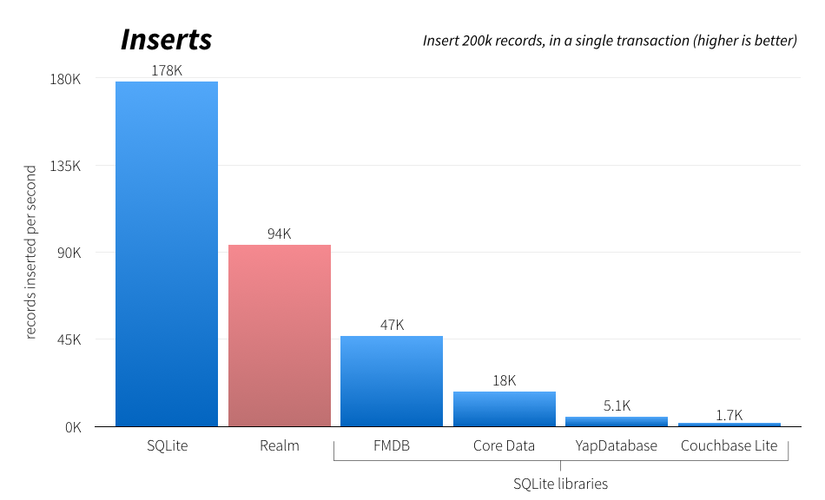
  • Dưới đây là bảng so sánh tốc độ của Realm so với các CSDL khác.
// Using Realm in Swift

var mydog = Dog(); mydog.name = "Rex"; mydog.age = 9

let realm = RLMRealm.defaultRealm()

realm.beginWriteTransaction()

realm.addObject(mydog)

realm.commitWriteTransaction()

var results = Dog.objectsWhere("name contains 'Rex'")
Không giống như một số các database khác, bạn có thể sử dụng trực tiếp bên trong ứng ựng IOS của ban (hoặc là với những ứng dụng Android) để lưu và truy vấn dữ liệu cục bộ trên thiết bị, cho phép bạn xây dựng các ứng dụng nhanh hơn. Chúng ta đã thấy nhiều thư viện cố gắng cung cấp các chức năng và tốc độ giống SQLite.Nhưng trái lại Realm nhanh hơn một số xử lý SQLite.
Counts Queries Insert Hiệu xuất của Realm đến từ việc nhiều năm phát triển trên một thiết kế lõi C++ được chỉnh sử để phù hợp với nhu cầu của nhiều thiết bị, nhờ áp dụng bit-packing, caching, vectorization và zero-copy architecture để nhận được lời ích tuyệt vời về việc sử dụng bộ nhớ và tốc độ. Nguồn bài viết: https://realm.io

Comments

Popular posts from this blog

Swift GCD part 1: Thread safe singletons

Preview Singletons are entities, referenced to the same instance of a class from everywhere in your code. It doesn't matter if you like them or not, you will definitely meet them, so it's better to understand how they work. Constructing and handling a set of data doesn't seem to be a big challenge at first glance. The problems appear when you try to optimise the user experience with background work and your app starts acting weird. ??‍♂️ After decades of watching your display mostly with a blank face, you finally realize that your data isn't handled consistently by the manager because you're accessing it (running tasks on it) from multiple threads at the same time. So you really do have to deal with making your singletons thread safe. This article series is dedicated to thread handling using Swift. In the first part below you will get a comprehensive insight into som...

Thread safe singleton’s in Swift

What are singletons? — Singleton is design patterns which says that there should be only one instance of the class for the lifetime of the application. One the best example of Singleton is AppDelegate . How to write a singleton class ? class DefaultDict{ private var dict:[String:Any] = [:] public static let sharedManager = DefaultDict() private init(){ } public func set(value:Any,key:String){ dict[key] = value } public func object(key:String) -> Any?{ dict[key] } public func reset(){ dict.removeAll() } }   Testing singleton class under concurrent circumstances. We are going to write an example where we will set values in dict from various threads and even try to access some with different threads. When we do this we will encounter a crash. If you look closely it will be because of race condition and the crash will be on line set(value:Any,key:String) . class ViewController: UIViewController { ...

Swift Tool Belt, Part 1: Adding a Border, Corner Radius, and Shadow to a UIView with Interface Builder

During my iOS work, I’ve assembled a set of code that I bring with me on every iOS project. I’m not talking about large frameworks or CocoaPods here. These are smaller Swift extensions or control overrides that are applicable to many projects. I think of them as my tool belt. In this post, I’ll show you an extension that will add a border, a corner radius, and a shadow to any UIView, UIButton, or UILabel and allow you to preview what it will look like in Interface Builder. Back in 2014, I wrote a blog post on Expanding User-Defined Runtime Attributes in Xcode where I added a border, corner radius, and shadow to a UIView using Interface Builder’s user-defined runtime attributes. This solution had no type checking—you had to type the property you wanted to modify by hand and often had to look up what it was called. You also had to run your project in order to see the effect of the runtime attribute. Starting with Xcode 6 , there is a new mech...