
Xử lý việc tùy chỉnh UIColors với cách chính xác trong iOS

Nếu bạn là nhà phát triển ứng dụng thì bạn chắc chắn phải đối mặt với một số thách thức khi xử lý nhiều mã màu mà bạn đã sử dụng trong nhiều ứng dụng.

Mở đầu

Nếu bạn muốn thay đổi màu sắc cho một UIView trên storyboard bạn sẽ phải thông qua một màn hình chọn màu hoặc bạn thực hiện việc này trong code thông các hàm khởi tạo màu của class UIColor như:
  • init(white: CGFloat, alpha: CGFloat)
  • init(hue: CGFloat, saturation: CGFloat, brightness: CGFloat, alpha: CGFloat)
  • init(red: CGFloat, green: CGFloat, blue: CGFloat, alpha: CGFloat)
  • init(CGColor cgColor: CGColor!)
  • init(patternImage image: UIImage)
  • init(CIColor ciColor: CIColor)
Điều này có vẻ khá là nhàm chán trong khi chúng ta phải thiết lập màu sắc bằng cách đưa ra các giá trị thích hợp, ví dụ:
self.view.backgroundColor = UIColor(red: 120/255, green: 150/255, blue: 200/255, alpha: 1)

Color Sets

Apple đã giới thiệu một thứ gọi là Color Sets từ Xcode 9. Color Sets sẽ giúp bạn xác định tất cả các màu của bạn tại một nơi. Bạn có thể dễ dàng thêm màu tùy chỉnh của mình. Thực tế, điều thú vị là bạn có thể đưa ra quy ước đặt tên thích hợp cho từng màu.
Ngoài ra nó sẽ rất hữu ích khi bạn muốn thay đổi các giá trị màu sắc, bạn sẽ thay đổi ở một nơi và nó sẽ cập nhật ở khắp mọi nơi. Là một Dev, bạn có thể dễ dàng nhớ màu đó bằng tên của nó, bạn cũng có thể reference và sử dụng nó trong một dự án khác. Điều này làm cho công việc lập trình của chúng ta dễ dàng phải không?
Nào! hãy bắt đầu với từng bước đơn giản sau đây:

Tạo Color Sets

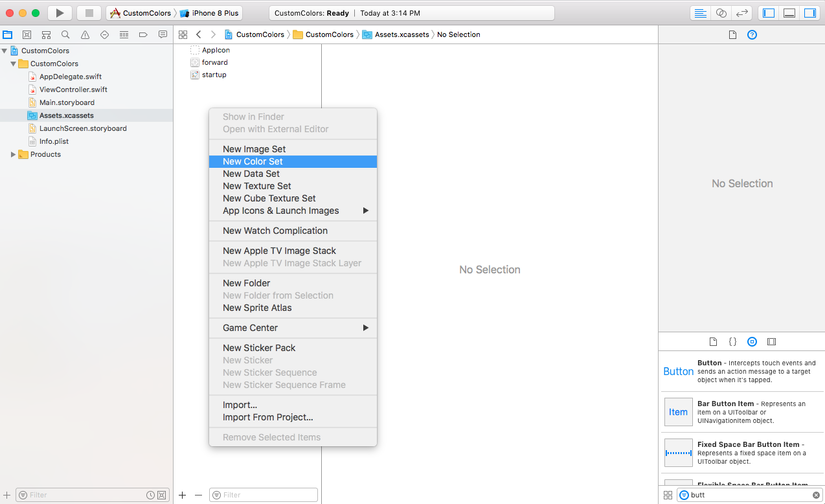
Bạn cần thêm mới một “New Color set” trong file assets của bạn.
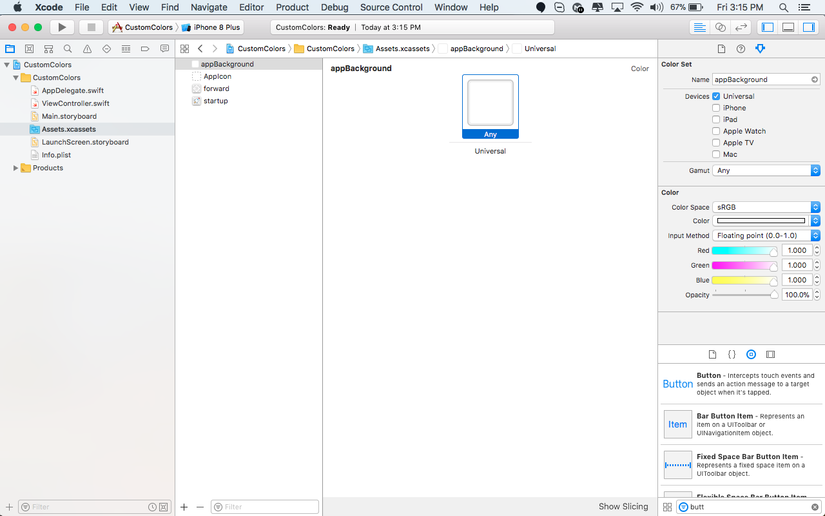
Lựa chọn một Color Sets và thay đổi màu theo yêu cầu bạn muốn trên màn hình tuỳ chỉnh màu.
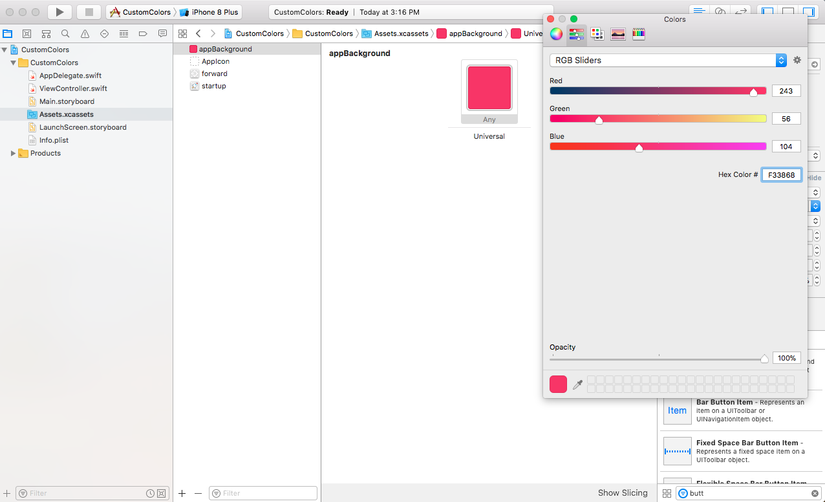
Tuỳ chỉnh màu sắc theo mong muốn của bạn.
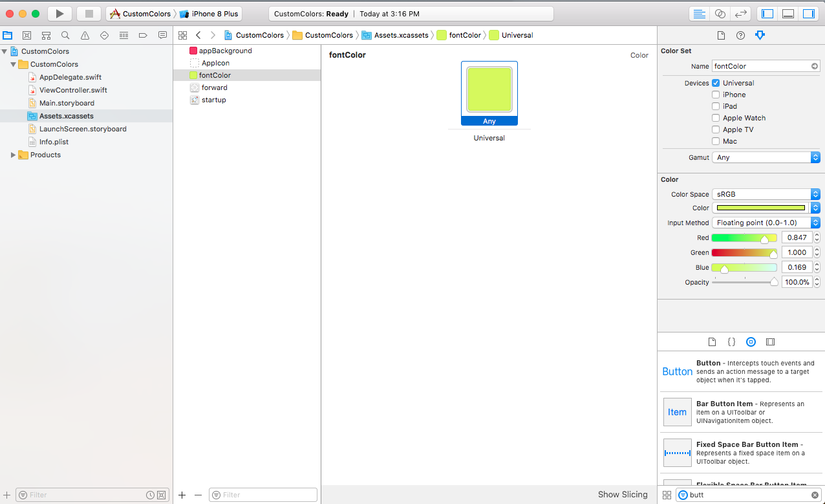
Thêm một vài màu khác với color sets ở đây tôi thêm vào màu cho Font.
Sử dụng Color Sets

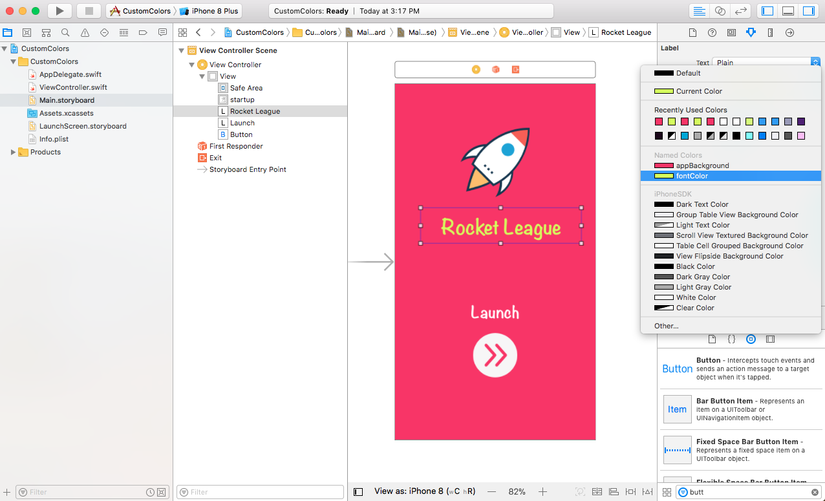
Bây giờ là lúc để sử dụng màu tùy chỉnh này vào ứng dụng. Trước tiên, chúng ta có thể đặt màu sắc của UIView ngay trên Storyboard thông qua màn hình chọn màu.

Lựa chọn màu nền cho UIView.

Lựa chọn màu cho nội dung text trên Label
Bạn cũng có thể kéo thả nhưng Color sest này ngay trong code của mình.
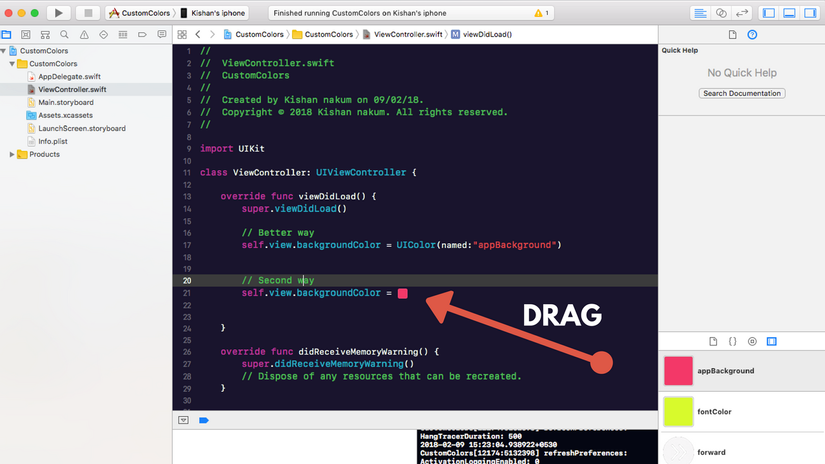
Khá là đơn giản phải không

Tóm lại

Có đôi chút tiếc nối khi đến tận xCode9 nó mới xuất hiện và chỉ hỗ trợ iOS 11 trở lên. Nhưng đây cũng là một tính năng khá hay ho khi lập trình. Một mẹo vặt mà không phải ai cũng để ý đến nó, có thể là bạn đã quá quen với những cách làm trước đó. Nhưng tôi tin chắc rằng bạn sẽ cảm thấy thoải mái khi sử dụng tính năng này.

Thank for reading!

Comments

Popular posts from this blog

Swift GCD part 1: Thread safe singletons

Preview Singletons are entities, referenced to the same instance of a class from everywhere in your code. It doesn't matter if you like them or not, you will definitely meet them, so it's better to understand how they work. Constructing and handling a set of data doesn't seem to be a big challenge at first glance. The problems appear when you try to optimise the user experience with background work and your app starts acting weird. ??‍♂️ After decades of watching your display mostly with a blank face, you finally realize that your data isn't handled consistently by the manager because you're accessing it (running tasks on it) from multiple threads at the same time. So you really do have to deal with making your singletons thread safe. This article series is dedicated to thread handling using Swift. In the first part below you will get a comprehensive insight into som...

Thread safe singleton’s in Swift

What are singletons? — Singleton is design patterns which says that there should be only one instance of the class for the lifetime of the application. One the best example of Singleton is AppDelegate . How to write a singleton class ? class DefaultDict{ private var dict:[String:Any] = [:] public static let sharedManager = DefaultDict() private init(){ } public func set(value:Any,key:String){ dict[key] = value } public func object(key:String) -> Any?{ dict[key] } public func reset(){ dict.removeAll() } }   Testing singleton class under concurrent circumstances. We are going to write an example where we will set values in dict from various threads and even try to access some with different threads. When we do this we will encounter a crash. If you look closely it will be because of race condition and the crash will be on line set(value:Any,key:String) . class ViewController: UIViewController { ...

Frame vs Bounds in iOS

This article is a repost of an answer I wrote on Stack Overflow . Short description frame = a view’s location and size using the parent view’s coordinate system ( important for placing the view in the parent) bounds = a view’s location and size using its own coordinate system (important for placing the view’s content or subviews within itself) Details To help me remember frame , I think of a picture frame on a wall . The picture frame is like the border of a view. I can hang the picture anywhere I want on the wall. In the same way, I can put a view anywhere I want inside a parent view (also called a superview). The parent view is like the wall. The origin of the coordinate system in iOS is the top left. We can put our view at the origin of the superview by setting the view frame’s x-y coordinates to (0, 0), which is like hanging our picture in the very top left corner of the wall. To move it right, increase x, to move it down increase y. To help me remember bound...